HF (13.56 MHz) Card Cloning Analysis Using Android & MCT
 İlayda Çatı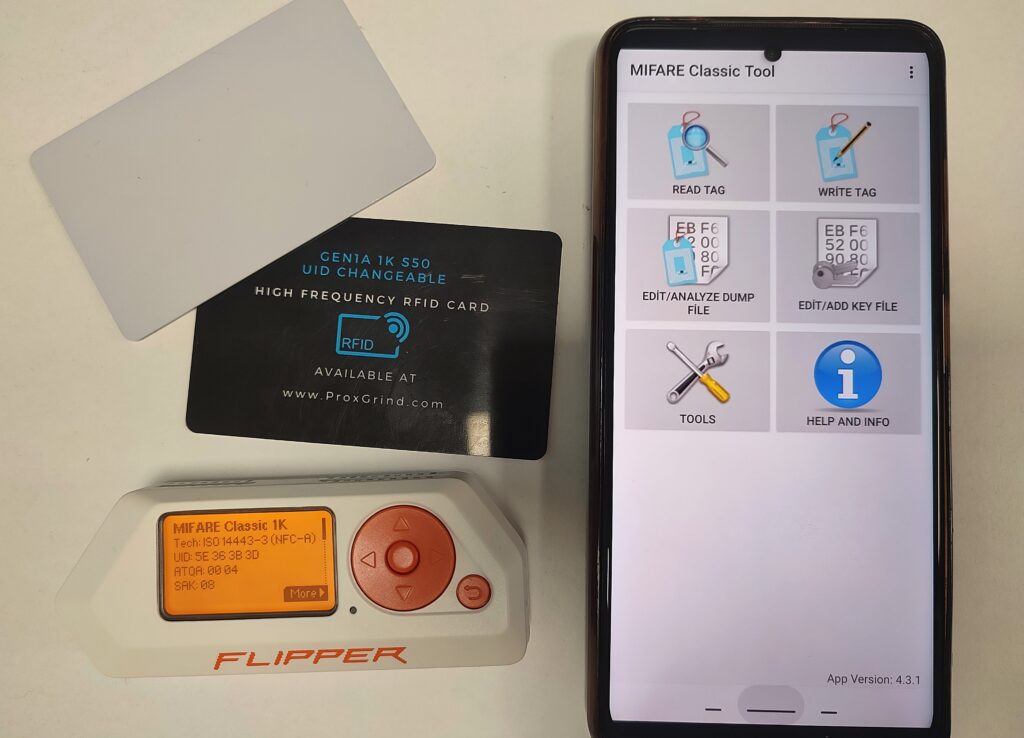
HF systems operating in the 13.56 MHz frequency band have a more complex memory structure and incorporate cryptographic security protocols compared to LF-layer technologies. In the analysis of these systems, hardware tools such as Proxmark3 can be used alongside smartphones equipped with integrated NFC chipsets. The NFC chip present in most modern smartphones can be transformed into an RFID reader/writer when paired with appropriate software.
1. MIFARE Classic Tool (MCT)
MIFARE Classic Tool (MCT) is an open-source application that utilizes the NFC interface on the Android operating system to access the memory blocks of cards based on the MIFARE Classic architecture. The tool enables operations such as reading card contents, saving dump files, and writing data to magic cards. Because the software is open source, it can be obtained not only from platforms such as Google Play Store and F-Droid, but also directly as an APK package via GitHub .
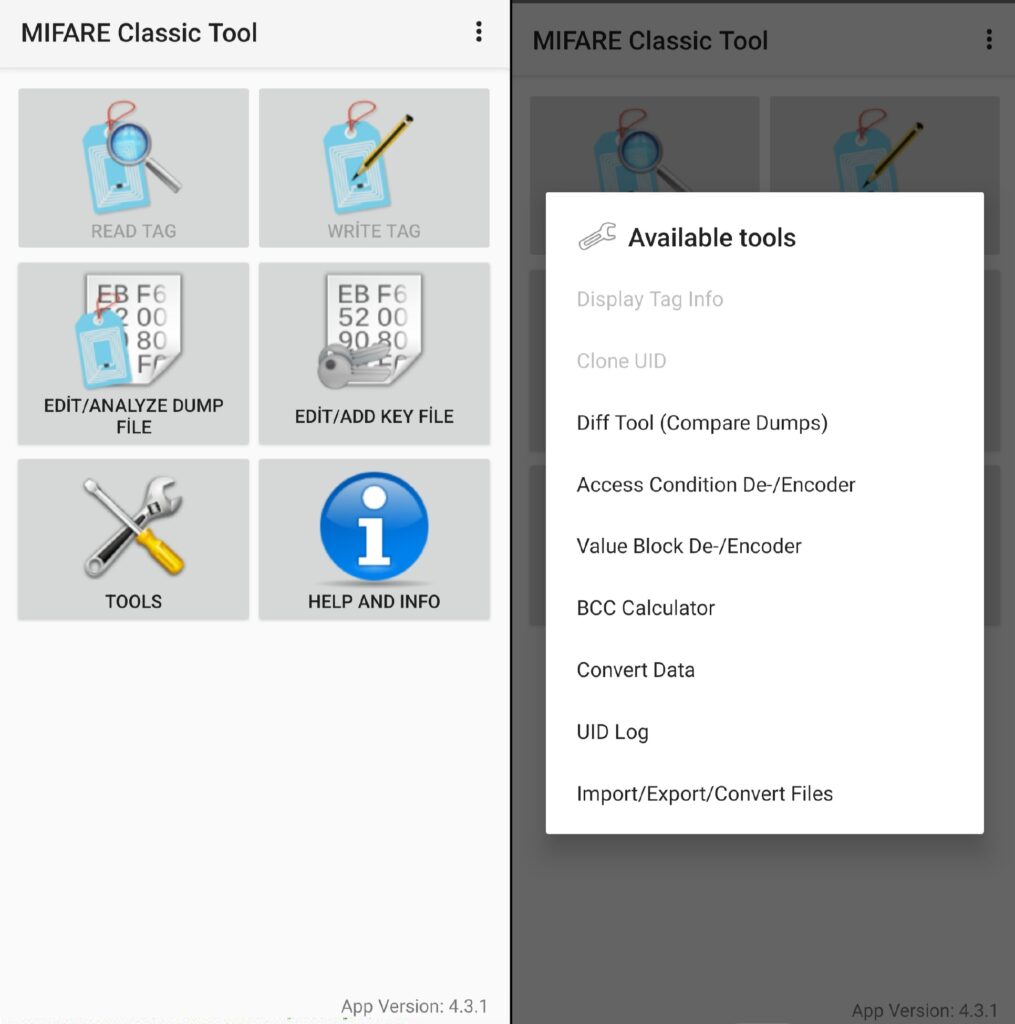
The figures below show the application interface and the Tools tab:
Application Main Interface
The READ TAG function enables the reading of protected sectors using predefined key lists, while WRITE TAG allows the acquired data to be written to a target card. During the workflow, hexadecimal data analysis can be performed via EDIT/ANALYZE DUMP FILE, and new key sets can be introduced into the system using the EDIT/ADD KEY FILE module to improve reading success rates.
Tools Section
The operations available in the interface are further supported by the TOOLS tab, which provides data conversion and calculation utilities:
- Display Tag Info: Reports the card manufacturer, ATQA and SAK parameters, and hardware UID information.
- Diff Tool (Compare Dumps): Compares two different card dumps, or dumps taken from the same card at different times, to identify modified sectors (e.g., stored balance changes).
- Access Condition De-/Encoder: Analyzes the Access Bits structure within MIFARE sectors and visualizes which blocks are readable, writable, or restricted.
- Value Block De-/Encoder: Converts hexadecimal representations of wallet/value blocks into integer values.
- BCC Calculator: Calculates the required Block Check Character (BCC) for Sector 0, Block 0 writing by performing an XOR operation over the UID.
- Import/Export/Convert Files: Converts data into formats compatible with tools such as Proxmark3 (.mct, .bin, .json).
1. Technical Background and R&D Analysis
MIFARE Classic Memory Architecture and Access Control
MIFARE Classic 1K cards contain an EEPROM structure divided into 16 sectors, each consisting of 4 blocks of 16 bytes. Each sector operates as an independent unit and includes its own security configuration:
- Sector 0, Block 0 (Manufacturer Block): Stores the card UID and manufacturing data. On standard cards, this block is hardware-locked and read-only.
- Data Blocks: The first three blocks of each sector (except Sector 0) are used for user data storage.
- Sector Trailer: The 4th block of each sector, containing two 6-byte secret keys (Key A and Key B) and 4 bytes of Access Bits.
Access Bits: Define the permission matrix determining which key can read, write, or modify (increment/decrement) specific blocks. For example, a common configuration such as FF 07 80 69 indicates that both keys have full access privileges, leaving the sector vulnerable to manipulation.
Gen1A vs. Gen2 Magic Cards
In field operations, the critical factor that enables an Android phone to function as a cloning device is the chip architecture of the target card. The Android operating system does not permit write commands to the hardware UID field (Block 0) through standard NFC chipsets. To bypass this limitation, two types of Magic Cards have been developed:
Gen1A (Backdoor Tag): The card type preferred in this study. Gen1A cards enable writing to Sector 0 using a proprietary backdoor command sequence outside the standard NFC command set. Since MCT can emulate these commands at the software level, cloning can be performed directly from the smartphone without requiring external hardware such as Proxmark3.
Gen2 (CUID/Direct Write): These cards support updates via standard write commands. However, most Android NFC chipsets block Block 0 write operations at the system level, making Gen2 cards generally incompatible with mobile cloning applications. Writing typically requires Proxmark3 or specialized USB RFID readers.
3. Implementation Process
Requirements : An NFC-enabled Android smartphone, the MCT application, and a Gen1A Magic Card.
1. Card Reading and Dump Analysis Procedure
- The Read Tag option was selected within the application.
- The target card was placed near the phone’s NFC antenna, and after selecting the appropriate key set, a full-sector read operation was initiated.
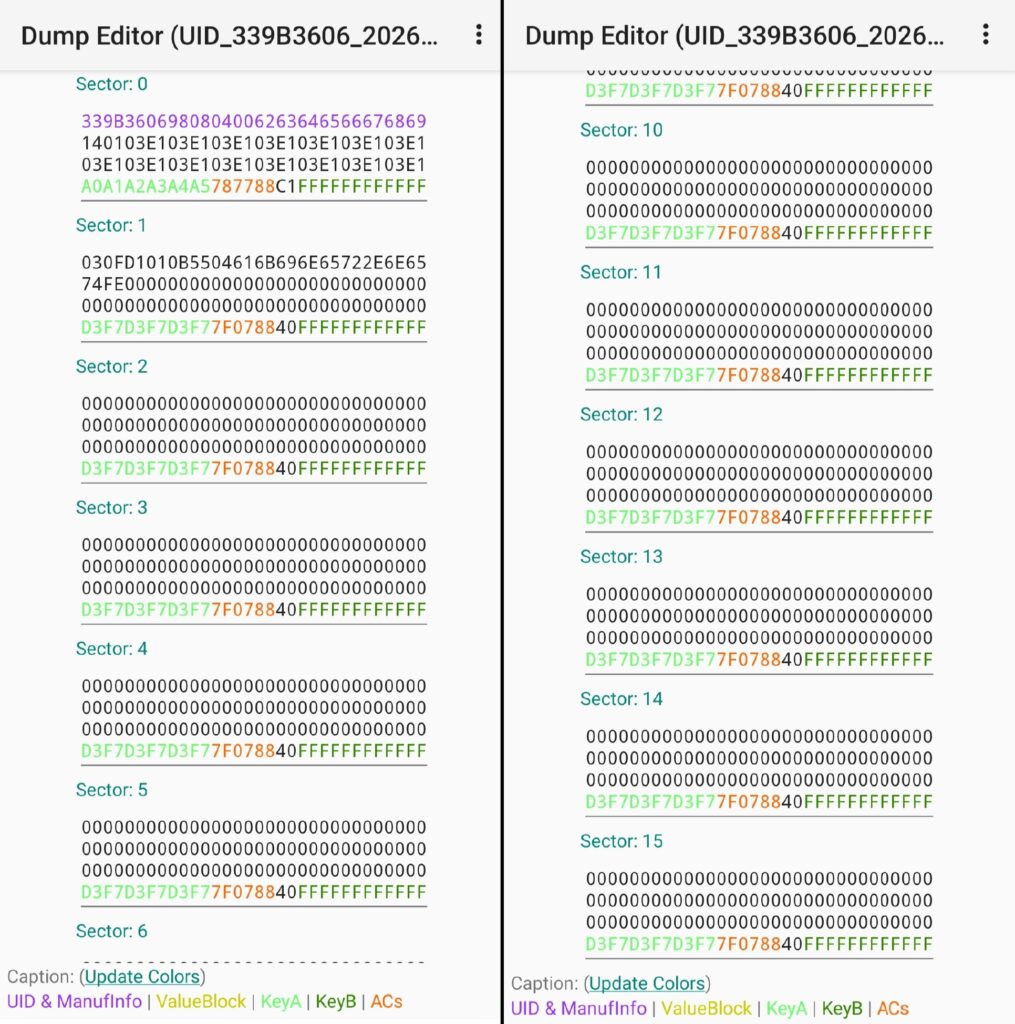
- Upon completion, all data blocks stored on the card were obtained in hexadecimal format and saved as a dump file for use in the cloning process, as shown below:
Dump Analysis Results:
The dump obtained from the card reading process presents the data blocks of the MIFARE Classic 1K architecture distributed across 16 sectors in hexadecimal format. The first highlighted row in Sector 0 (shown in purple) contains the card’s hardware UID and manufacturer information. The colored fields (green and orange) located in the last block of each sector represent the Key A, Key B, and the corresponding Access Conditions that control access to that sector.
The "00" values observed in the remaining blocks indicate that those portions of the card have not yet been used for data storage and are currently empty.
2. Data Transfer to the Magic Card
To copy the acquired data onto another card, a special UID-changeable / Magic card with a writable Sector 0 is required. In this implementation, a High-Frequency Gen1A 1K S50 UID Changeable Magic Card was used.
Writing Procedure
- While scanning the HF Magic Card via NFC, the WRITE TAG module was selected from the application’s main interface.
- The Write Dump (Clone) option was chosen, and the previously saved dump file was loaded.
- Before initiating the write operation, parameters under the Show Options menu were configured:
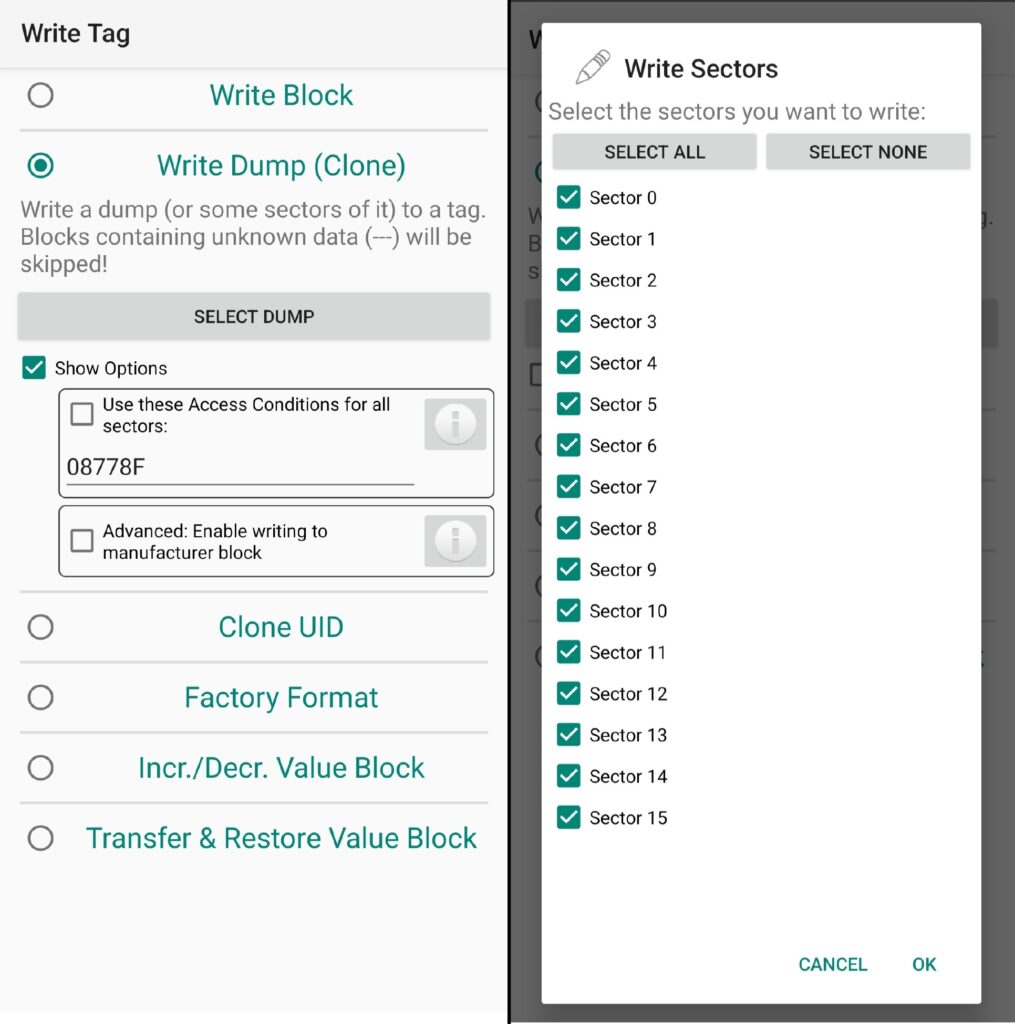
- Advanced → Enable writing to manufacturer block: This option allows access to Sector 0, Block 0 by leveraging the hardware backdoor of the Magic card. If this option is not enabled, the UID of the card will remain unchanged, and full cloning will not occur.
- Use these Access Conditions for all sectors: If the target card’s access permissions differ from those in the original dump, this option synchronizes the access bits across all sectors to improve write reliability.
- Sector Selection and Execution: The sectors intended for writing were selected, and the process was completed. For cloning accuracy, selecting all sectors is generally preferred to ensure a complete replication of the original card structure:
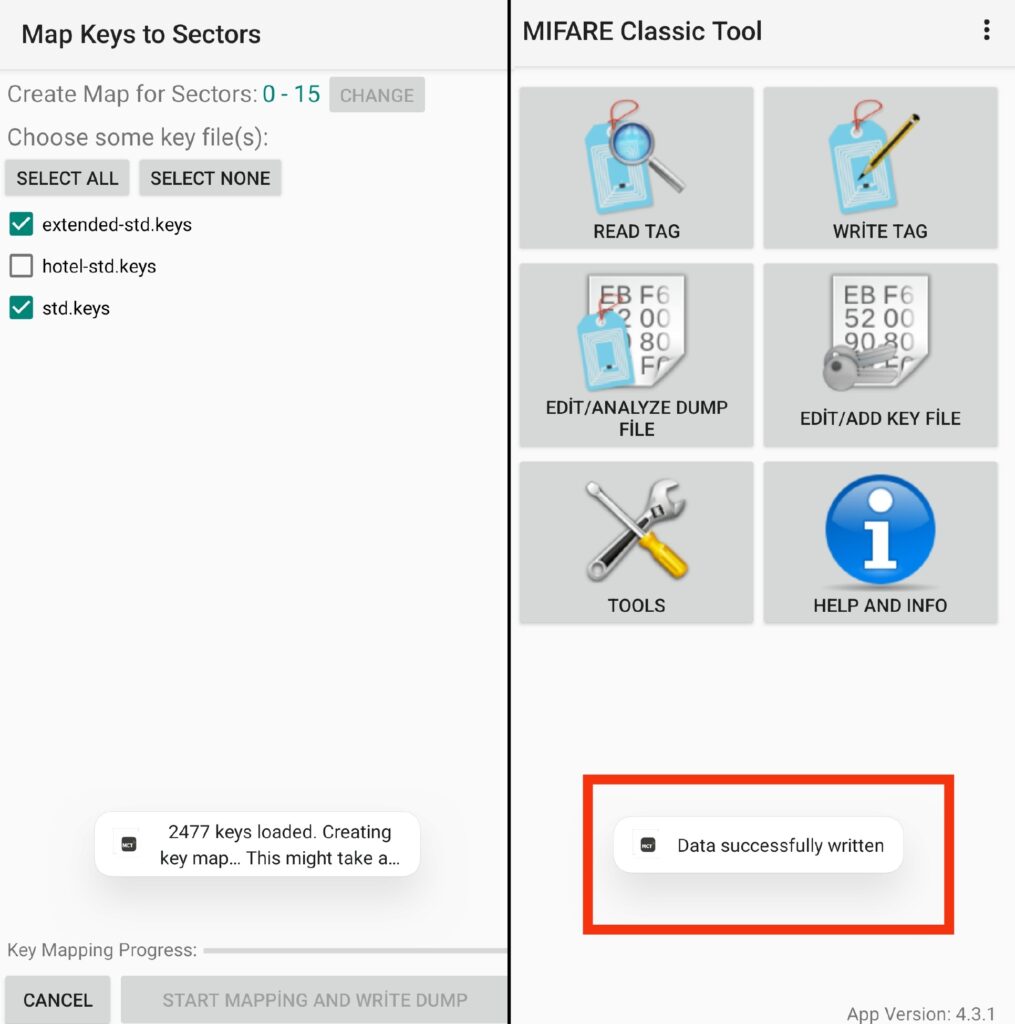
Before the write operation can begin, the application must match the appropriate keys (key files) to access the target card’s sectors. At this stage, standard key lists such as std.keys and extended-std.keys are typically selected, allowing the encrypted sectors of the target card to be unlocked through a dictionary-based trial process. When the START MAPPING AND WRITE DUMP button is pressed, the application first scans thousands of candidate keys to verify that the card is writable. Once access is successfully established, it sequentially transfers the data blocks to the physical chip.
After the writing process is completed, the card’s new memory content becomes fully synchronized with the data contained in the dump file.
4. Verification and Cross-Check
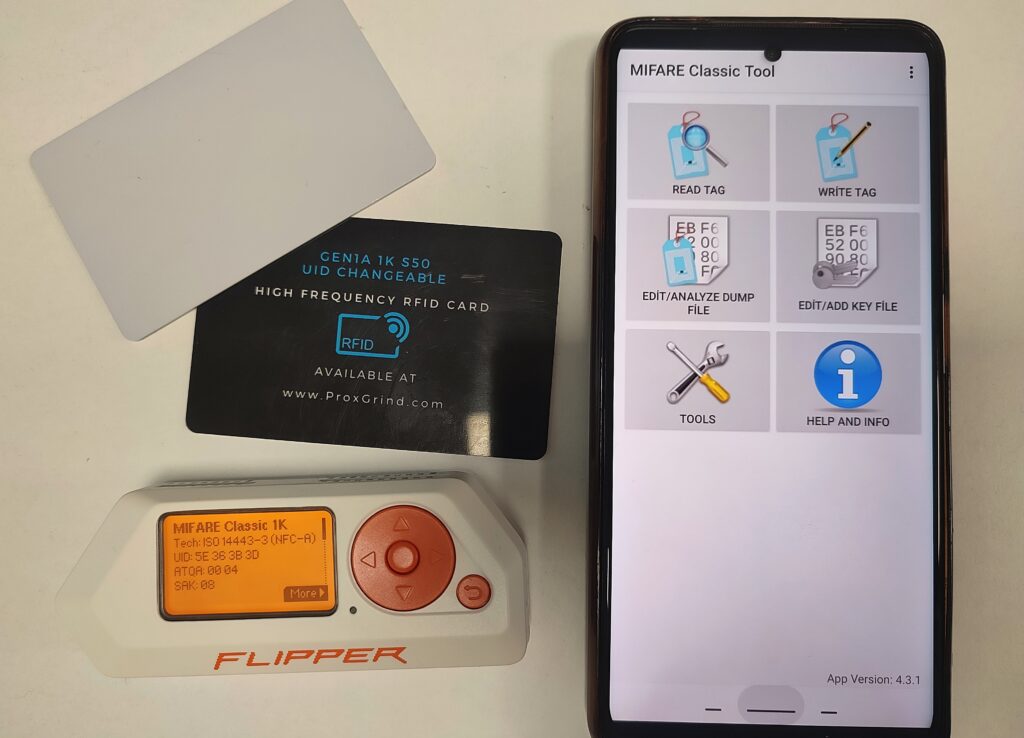
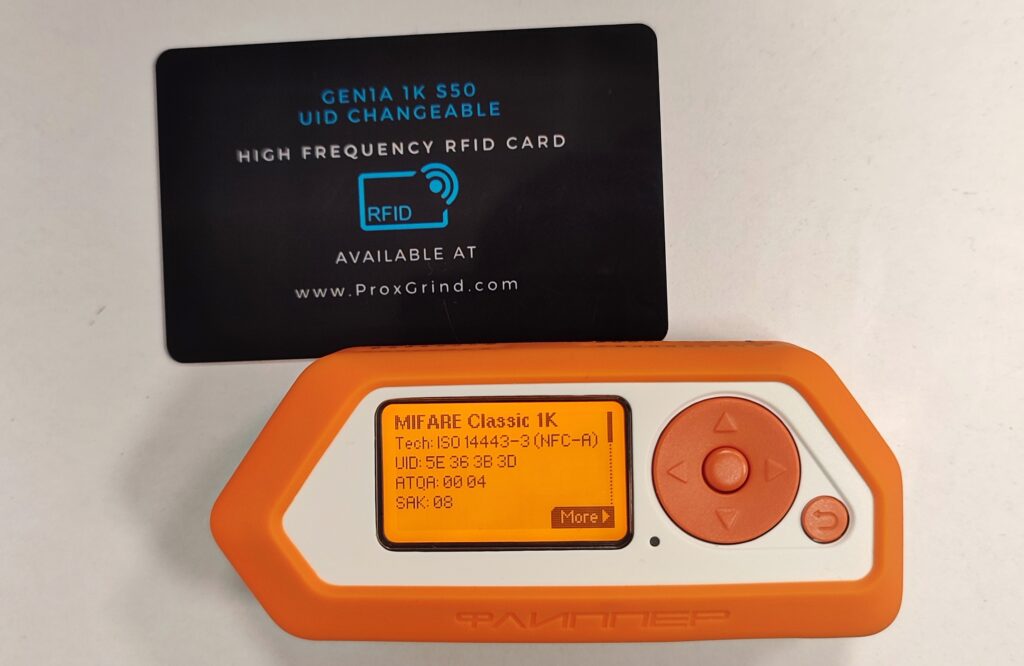
After completing the cloning process, a verification test was performed using the Flipper Zero tool to assess the compatibility of the newly created physical copy with the original card. The analysis confirmed that not only the UID value (5E 36 3B 3D), but also the ATQA (00 04) and SAK (08) parameters matched the original card exactly, demonstrating a successful one-to-one replication at both the identifier and protocol levels:
5. References
About the author
İlayda Çatı
Physical Spy
Subscribe to the newsletter
New cybersecurity articles, research and hardware-lab notes — straight to your inbox.
Related articles

MouseJack Attacks and RF Signal Analysis in nRF24L01+ Chips
Rolling Code (KeeLoq) Cryptography and RollJam Attack Architecture in Wireless Access Systems